Network security is a key aspect of IONODES’ Secure Display Stations (SDS) line of appliances. This article will focus specifically on the 802.1X feature, available on both the R200, as well as the R100S.
What is it?
IEEE 802.1X is an IEEE Standard for port-based Network Access Control (PNAC). It is part of the IEEE 802.1 group of networking protocols. It provides an authentication mechanism to devices wishing to attach to a LAN or WLAN.
How does it work?
802.1X authentication involves three parties: a supplicant (client device that wants to attach to the network), an authenticator (the network device that the supplicant directly connects to in order to access the network), and an authentication server.
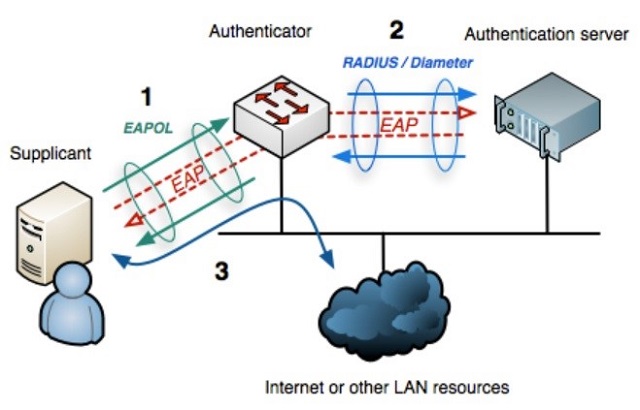
The authenticator acts like a security guard to a protected network. The supplicant is not allowed access through the authenticator to the protected side of the network until the supplicant's identity has been validated and authorized. In order to get authorized the supplicant must initially provide the required credentials (username & password) to the authenticator - these will have been specified in advance by the network administrator.
The authenticator forwards these credentials to the authentication server to decide whether access is to be granted. If the authentication server determines the credentials are valid, it informs the authenticator, which in turn allows the supplicant (client device) to access resources located on the protected side of the network.
How can I easily test the 802.1X functionality?
A simple lab setup is proposed below. A switch with 802.1X functionality will act as the authenticator for an R200 appliance, while the authentication server will be simulated by the software FreeRADIUS.net running on a laptop attached to the same network segment.
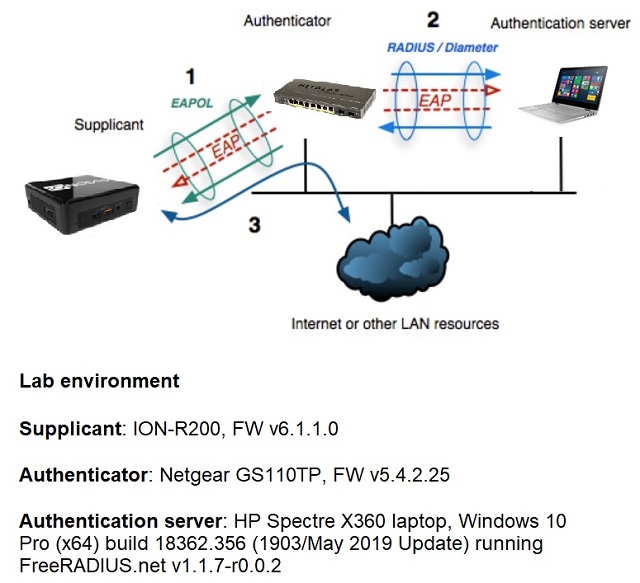
Configuration of the authenticator and authentication server will depend on the hardware/software environment used, so please refer to your respective manufacturer(s)/developer(s) for more details.
In our example, we’ve used the following guides:
- authenticator: https://kb.netgear.com/24753/How-do-I-configure-802-1X-based-authentication-on-a-smart-switch
- authentication server: https://www.tldp.org/HOWTO/8021X-HOWTO/freeradius.html
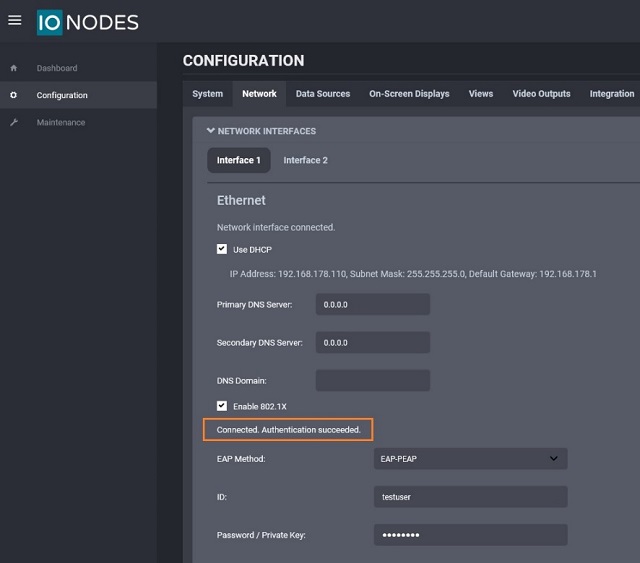
The user can input the credentials to access the network in the R200’s web management interface Configuration > Network > Ethernet section. The appliance will then provide feedback based on the progress of the authentication process. The message “Authentication Succeeded” should appear once a successful authentication has been completed.
What benefits does the 802.1X functionality bring to the end user of the SDS?
Having secured access to the internal network is a critical point for all deployments in public areas or facilities with few or no trained security staff (like for instance having a spot monitor in a retail shop, healthcare clinic or logistics center).
A malevolent person could physically disconnect the Eth cable from the SDS and attach it to his own device in order to instantly gain access to the LAN. With 802.1X authentication, access will only be granted to his device if it supplies the correct credentials, therefore mitigating any risk of rogue/unauthorized users. On top of that, the network admin can easily track and remove individual authenticated users without affecting access for the others on the network. Flexibility and peace of mind, all in one with the SDS family of devices from IONODES!