How to decode multicast streams using VLC on the ION-R100
Multicast streaming is a one-to-many relationship between a media server and the clients receiving the stream. With a multicast stream, the server streams to a multicast IP address on the network, and clients receive the stream by subscribing to that IP address.
Because there is only one stream from the server regardless of the number of clients receiving the stream, a multicast stream requires the same amount of bandwidth as a single unicast stream containing the same content, thus increasing network efficiency. However multicast requires hardware support from the network infrastructure and its benefits are usually limited to local area networks as data sent to a Multicast IP is not forwarded by routers, gateways and firewalls (unless they are specifically designed and configured to do so, but these are rare, specialized equipment).
In order to receive and decode a Multicast stream coming from an ION encoder there are 2 possibilities. The first one is the Active mode, where the video stream decoder will establish a connection directly to a video stream source (in our case it’s the ION encoder) and request the required video stream. In the popular software decoder VLC, this can be achieved by forcing Multicast RTP via RTSP from the Advanced Preferences.
Multicast streaming is a one-to-many relationship between a media server and the clients receiving the stream. With a multicast stream, the server streams to a multicast IP address on the network, and clients receive the stream by subscribing to that IP address.
Because there is only one stream from the server regardless of the number of clients receiving the stream, a multicast stream requires the same amount of bandwidth as a single unicast stream containing the same content, thus increasing network efficiency. However multicast requires hardware support from the network infrastructure and its benefits are usually limited to local area networks as data sent to a Multicast IP is not forwarded by routers, gateways and firewalls (unless they are specifically designed and configured to do so, but these are rare, specialized equipment).
In order to receive and decode a Multicast stream coming from an ION encoder there are 2 possibilities. The first one is the Active mode, where the video stream decoder will establish a connection directly to a video stream source (in our case it’s the ION encoder) and request the required video stream. In the popular software decoder VLC, this can be achieved by forcing Multicast RTP via RTSP from the Advanced Preferences.
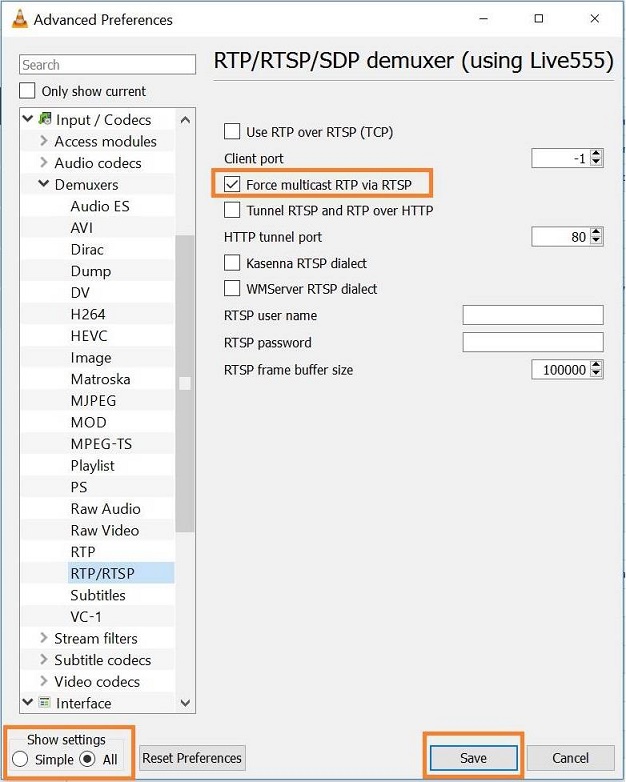
After that the user can simply open the stream in VLC with the usual URL (the same URL that is used for Unicast transmission) from an ION encoder. Having a Wireshark capture shows that the stream coming from the encoder is received by VLC on the Multicast address.

The second option is the Passive mode, where the decoder does not establish any connection; it simply opens up a listening network port and waits for an incoming stream (RTP). In VLC this mode requires a custom created *.sdp file, describing the initialization parameters of streaming media session.

There is also the possibility of using an IONODES ION-R100 standalone hardware decoder to receive & decode the multicast stream. It supports both modes (Active & Passive), giving the user a lot of flexibility for integrating into different applications.