How to perform a firmware update or downgrade
In this technical note we’ll show you just how easy it is to perform a FW update or downgrade on an IONODES product.
Where can I find the upgrade/downgrade packages?
For IONODES Commercial & Enterprise products, the packages can be found on each product’s web page, on the main IONODES website ( Products - IONODES ).
For IONODES OEM products, the packages can be found on the Customer Portal, on the dedicated OEM website ( Customer Portal | IONODES Imaging Technology ). A user account is required to access this section. If you do not have one please contact the IONODES Technical Support team and they’ll be happy to assist you.
If, for whatever reason, the specific package that you are looking for is not available in the locations indicated above, the IONODES Technical Support team will provide you a private download link.
What’s the difference between the different package types for the same product?
There are 2 main package types that may be available: GA (General Availability) and RC (Release Candidate). The GA is the most stable version, that has undergone successfully our long-term stability tests.
RC versions are newer versions, that have only passed our basic testing. It is strongly recommended that you fully qualify them in your environment before deploying in the field.
In terms of size, the packages can be full or incremental. A full package can allow the user to upgrade from basically any current FW version (for exceptions please contact IONODES Technical Support), but it’ll take longer to perform the update and the package size is bigger. On the other side, an incremental update is much smaller and faster to install, but it requires a specific current version to update from.
What are the drawbacks for a downgrade?
The main drawback of a FW downgrade is the fact that the product’s configuration is cleared and replaced with the factory settings. This is normal because older FW versions do not contain all of the features introduced in the newer ones, so the configuration cannot remain the same.
Also, keep in mind that older FW versions do not contain the latest bug fixes, so please use them carefully.
How can I perform the FW update/downgrade?
There are 2 possibilities to perform a FW update/downgrade: from the Maintenance section in the web management interface or by using the IonConfigTool (ICT). The advantage of ICT is the fact that it allows batch updates, which means updating multiple units of the same type, at the same time. This is very useful particularly for large scale deployments.
ICT can be downloaded from the Resources > Tools and Documentation section, on the main IONODES website: Tools and Documentation - IONODES
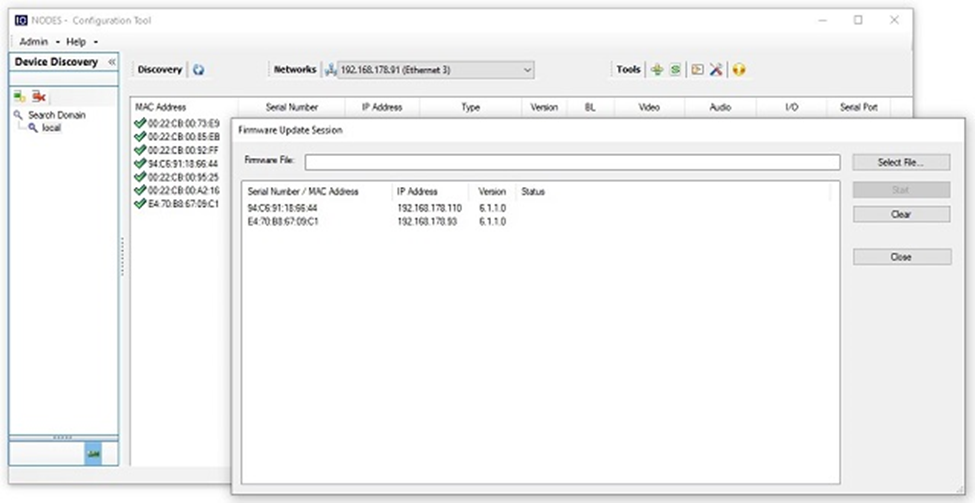
The current status of the update/downgrade process will always be reported, either in the web interface or in ICT, based on where the process was started from. Depending on the product, the process can take some time, so please be patient and wait until you receive a confirmation that it was completed successfully or a message that an error has occurred (in this case you should contact IONODES Technical Support team for further assistance).