Body camera function buttons and recording concepts

Introduction
The PERCEPT wearable IoT body camera boasts many sought-after advanced features.
In this document, we’ll take a look at the physical buttons built into the device. We’ll explain what their default functions are and what other functions they can be used for.
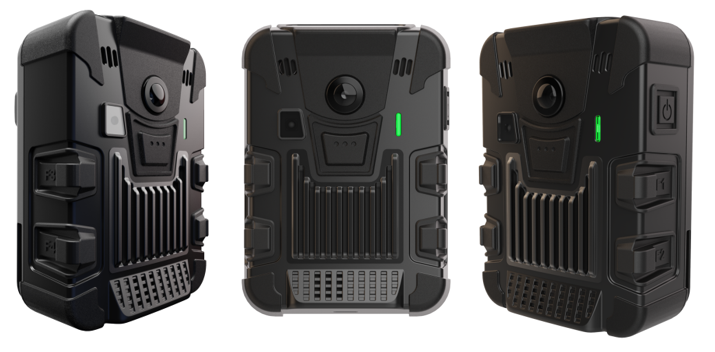
The PERCEPT body camera has 5 integrated function buttons in addition to the Power button.
There are 2 function buttons on each side of the PERCEPT body camera (labeled F1, F2, F3, and F4), the power button on the right side, and an additional oversized button on the front (F5). All are recessed to avoid any accidental presses.
Button functions
Buttons on the PERCEPT body camera are pre-defined to perform different actions based on how long they are pressed or if pressed in conjunction with other buttons. Their default function is summarized in the table below (for more details please see the user manual):
| Button | Default function |
| Power | Powers the body camera on or off |
| F1 | Records an event |
| F2 | Records a still image |
| F3 | Records an event |
| F4 | Records a still image |
| F5 | Starts/stops continuous recording |
| F2 & F4 | Turn LED flashlight on or off |
| F1 & F2 & F3 & F4 | Resets the body camera to factory default settings |
| F1 & F3 | Turns the Privacy Mode on or off |
| F2 & F4 | Activates the QR scan mode for the body camera |
Recording concepts
The body camera has two recording modes: continuous recording (records video continuously until instructed to stop) and event recording (tags events via metadata inside the video file if already in continuous recording or records a short clip based on pre-buffer and post-buffer if not already in continuous recording mode).
To make it even easier to start recording with the device powered off, we’ve also introduced the concept of emergency one-touch recording. Basically, the end-user simply needs to press and hold one of the recording functions buttons (F1, F3, or F5) for 3 or more seconds and that will automatically cause the device to power up, enter into continuous recording mode and start recording right away, without any additional user intervention.
Conclusion
With multiple function buttons, the PERCEPT body camera allows you plenty of flexibility in accessing its many advanced features, literally, at the touch of a button, or two.